AI travel assistant
A travel guide that actually knows your trip.
Not a generic chatbot — the assistant uses your destination, dates and who's travelling to answer in a way that fits your holiday. Ask a question, get a clear answer, keep the good ones.
Free essentials · iPhone & Android
Ask anything
One question at a time, answers that fit.
Tap a suggestion or type your own. Each answer replaces the last so the screen stays clean, and you can save the good ones to your trip or turn a list into a tickable checklist.
It uses your trip details to give practical, specific suggestions — routes, packing, local ideas and places worth checking out — so you get a useful answer, not a generic one.
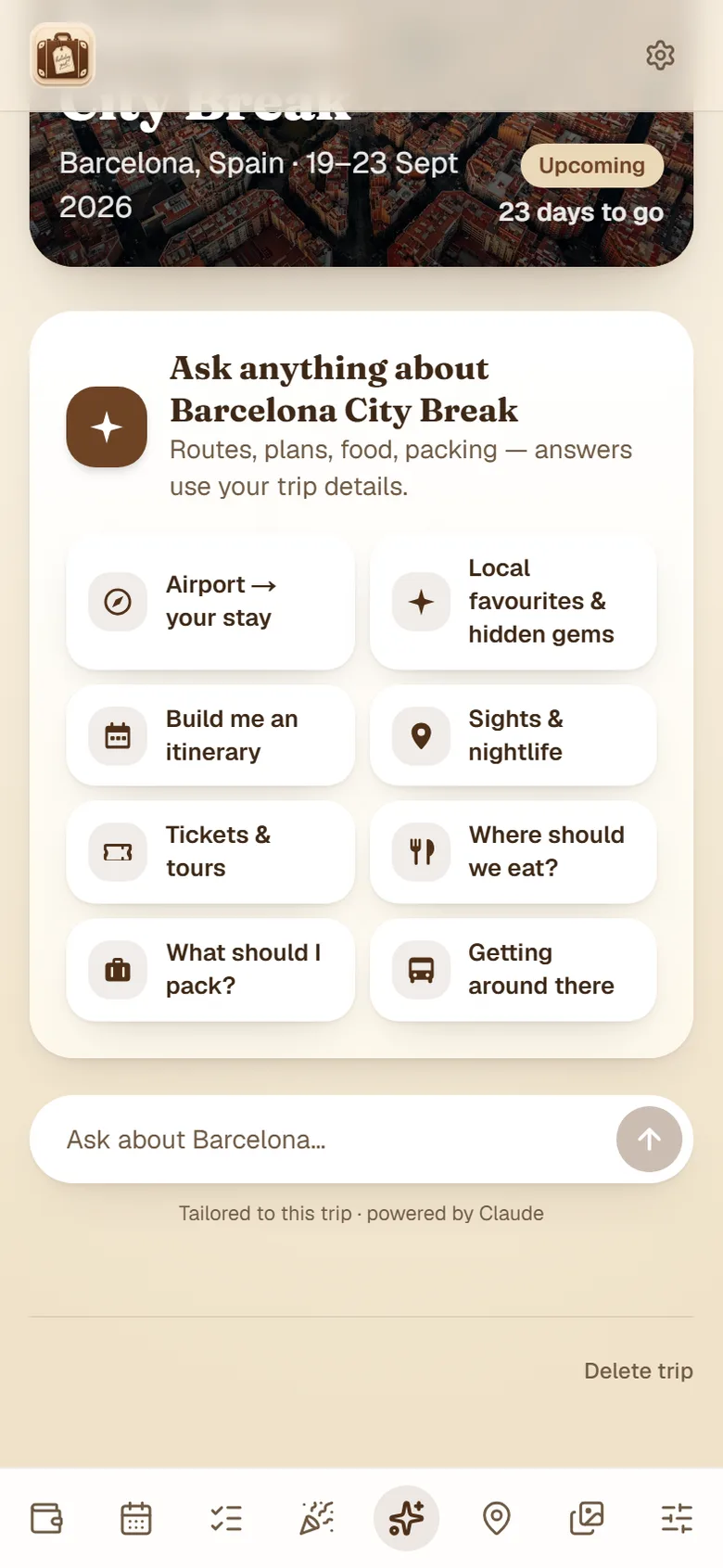
Where the locals go
Well-loved favourites and up-and-coming spots worth checking out — specific places for where you're going, not the same old tourist list.
Build me an itinerary
A relaxed day-by-day plan for your dates, with the must-sees and time to breathe.
What should I pack?
A packing list tailored to your trip length and destination — turn it into a checklist in a tap.
Cheapest way around
How to get about for less — passes, walking routes and when a taxi is actually worth it.
Where to eat
Local spots, the regional speciality, family-friendly options and date-night places.
Save the good ideas
Keep any answer in your trip's memories, or send a list straight to your checklists.
Why an assistant that knows your trip beats a blank chat box
Most trip planning does not fail because the information is hard to find. It fails because it is scattered — a few browser tabs, a friend’s recommendation buried in a WhatsApp thread, a blog post from 2019, and a chatbot that has to be told the same details every single time you open it.
The assistant is useful for the same reason a good local is useful: it already knows the situation. It has your destination, your dates, how long you are there and who is coming, so “what should we pack?” becomes a list for your trip, in your month, with your travelling companions — rather than a general article about packing. And because it sits inside the trip, a good answer does not evaporate when you close the tab. Save it and it is there next to the boarding passes.
That last part matters more than it sounds. On a group trip the person who does the research is usually the only one who ends up knowing the plan. Answers saved to a shared trip are answers everyone can see, which is the difference between one person being asked the same question fifteen times and everybody just knowing.
What it is good at, and where to double-check
Being straight about this is more useful than overselling it. The assistant is strong on anything that is really about judgement and orientation — building a sensible shape for a city you have never visited, working out what is genuinely worth your time when you only have a weekend, what an area is like, what to pack for a particular month, and roughly how people get around.
It is weaker on facts that move. Opening hours, ticket prices, whether a specific restaurant is still trading and precise timetables all change faster than any model reliably tracks. Use it to decide what you want to do, then confirm the details that would actually ruin your morning if they were wrong — the booking, the opening time, the last train.
For the things that genuinely need to be live rather than remembered, the app uses real data instead of the assistant: flight status and gate information come from a live flight feed, and airport security waits are their own feature. The assistant is for planning, not for departure boards.
Where it fits with the rest of the trip
The assistant is one part of a trip wallet, and everything it produces lands somewhere useful — an itinerary onto the trip timeline, a packing list into your checklists, a recommendation into the trip’s saved notes — sitting next to the boarding passes and travel documents you are already storing.
It works the same whether you are planning a fortnight abroad, a cruise, a family holiday or a single day out. On a group trip it is arguably most useful of all, because the answers are shared rather than trapped on one person’s phone.
Plan smarter, not harder.
Let the assistant do the research while you enjoy the trip.
Free essentials · iPhone & Android
AI travel assistant — common questions
What is an AI travel assistant?+
It is an assistant built into your trip that answers travel questions using the details you have already saved — where you are going, when, how long for and who is travelling. Rather than searching and stitching together a dozen browser tabs, you ask a question in plain English and get an answer shaped around your actual holiday. It can also turn an answer into something usable: a note saved on the trip, or a tickable checklist.
How is this different from just using ChatGPT to plan a trip?+
The difference is context. A general chatbot starts from nothing every time, so you re-type your dates, your destination, how many of you there are and what you have already booked — and it still cannot see your itinerary. The assistant here already has all of that, because it lives inside the trip. Ask what to pack and it knows the trip is five nights in October with a toddler. Ask how to get in from the airport and it knows which airport, because your flight is saved. And the answer can be kept on the trip where everyone travelling can see it.
Can it build a full day-by-day itinerary?+
Yes. Ask it to build an itinerary for your dates and it produces a relaxed day-by-day plan with the main sights and some breathing room, rather than an exhausting list that assumes you want to be out from seven in the morning. Save the plan to the trip and edit it by hand afterwards — it is a starting point you own, not a fixed schedule.
Does it know about my actual bookings?+
It uses the trip details you have saved — destination, dates, length of stay and who is travelling — to shape its answers. That is what makes the suggestions specific rather than generic. It is there to help you plan around what you have booked, not to change your bookings.
Can I trust what it tells me?+
Treat it as a very well-read friend rather than an official source. It is genuinely good at ideas, structure and orientation — what is worth seeing, roughly how to get about, what to pack, what a neighbourhood is like. It is less reliable on details that change: opening hours, ticket prices, whether a particular restaurant is still trading. Anything you would be annoyed to get wrong on the day is worth a quick check with the venue or operator before you rely on it.
Is the AI travel assistant free?+
The trip wallet itself is free — storing bookings, boarding passes, tickets, your calendar, checklists, the countdown and the budget tracker. The AI assistant is one of the Plus features, so you can see it on a free account but need Plus to use it. You can unlock it for a single trip with a one-off Trip Pass, or across everything with a Plus subscription.
Does the assistant work offline?+
The assistant itself needs a connection, because it generates the answer as you ask. But anything you save from it — an itinerary, a packing checklist, a note about getting in from the airport — is stored on the trip and available offline alongside your boarding passes. It is worth asking your questions and saving the answers before you fly, so the useful parts are there when you land without signal.
What sort of things should I ask it?+
The practical questions get the most useful answers: what should I pack for this trip, how do I get from the airport to the centre, what is worth seeing if we only have two days, where do locals actually eat, is a transport pass worth buying, what is the area we are staying in like. Broad questions such as 'plan my holiday' give broad answers — the more specific the question, the more useful the reply.